Jan 20, 2009

020 Dreaming of Home

Last night I dreamed that I was back in my little hometown of Greenville, California. It is way up north in northern CA... in the middle of nowhere!

In the dream I had my camera and I was so excited to be able to take photos of my little town for my project 365. I was right there by the high school and wanted to take a photo of the stand of trees east and north of the "new" gym (keep in mind that I graduated 39 years ago!!). I could hear the wind whispering through the pine needles, I could feel soft air on my face, I could smell that sharp resiny tang of the forest... and then I woke up! I wanted to cry!

You see Greenville is over 600 miles from where I live now and all of my family is long gone. So I had to do the next best thing (and in this case, it is a very sad substitute). I dug through my photos and found one of my favorites taken from our back porch in 1966. The grove of trees just to the left of the low buildings, which is the k-12 campuses, are the trees I wanted to photograph in my dream, but from the Hwy looking towards my house. (the opposite direction)

Photobucket
FONTS- Problem Secretary, CK Cursive, BRUSH- KPertiet_LedgerGrids-9, Orton Effect

I took growing up in the lush Plumas National Forest for granted. Now I realize what a treasure I had. I used to love to ride my horse through those trees or I would walk past them on the way to my friend, Crystal Slapnik's house.

I wrote to my wonderful niece and asked if she had any recent photos of Greenville... sadly she didn't either. I can share one that shows similar trees taken at the Taylorsville Rodeo in 2002.

rodeo trees
(Scrap Matters sm_caj_hsg_frame)
DN and I discussed the fact that we will have a different set of eyes on our next visit to Greenville. But even at that how can a camera capture all the emotion left in that little mountain town?

Jan 19, 2009

019 Keep a Journal

So here I am... 7 in the evening... my only trip outside in the below freezing Wasatch winter was to bring in our recycling wheelie-bin... and, you guessed it, no photo for this day! I thought I was toast!

019

Then I thought... wait, I've spent the whole day doing a very good thing! Why not take a photo of that! Our Prophets have urged us to keep a journal; mine isn't a daily affair (though this year it will be with my project 365!) Neither of my parents kept a journal or diary and I have hungered to know them and what they thought. I haven't had the blessing of just being able to ask them.

Over the years I've tried different things. I started with a funny little 5-year diary in my teens that probably only has two dozen entries. In the mid-seventies I "graduated" to spiral bound notebooks, you know, the stenographer kind. Ah, but then the computer became my friend! And I've been very happy ever since!

January frequently finds me in a journal frenzy! One year I compiled all of my letters, notes, etc from about 5 years and printed all of them out; bringing me up to date. This year I needed to finish up 2007 (yep, a year behind) adding my blog entries and printing it out (only 28 pages for 2007).

I now have 2008 all edited and the first 50 pages printed. If I ask my senior printer (probably 5 year old) to print too many pages at a time the color starts going wonky. But if I let it rest an hour or two the cartridge seems to re-power itself and will print another 20-30 pages.

I suppose that it is very telling that my blog has, for the most part, become my journal. I do have personal things that aren't on my blog, but you know me... I'm kind of an out there girl. Also telling is that 2008 is 128 pages. I think that blogging is good for my journaling habit!

Jan 18, 2009

018 Baby Sweetness

Today is Third Sunday Family Dinner at our house. I love this tradition. I love having my family around me and the grandchildren here. What a blessing to have them close. This year with the time changes for our Sunday meeting times (Doug's family @ 2-5, Kevin's family & us both @1-4) dinner has to be a little later. Kevin, Suzi and baby Ethan arrived that the old appointed time of 5pm so we had a chance to visit. Camille played with Ethan on our large kitchen counter while we visited and I finished up dinner.

Ethan is at that wonderful creeping stage right now. He loves to explore and discover. He was enthralled with a half-filled gold foil can of truffles left over from the holidays and he emptied most of Grammie's Kleenex box... all, I might add, to our delight and entertainment. I grabbed the camera and got several great shots, but the winner for *this-day* is he little baby-sweetness hand splayed on the counter.

018

More Harley

Yesterday Harley and I went for a much-needed walk... I knew what this meant! By the time we got home his paws and *undercarriage* are wet, filthy and filled with dirty, gritty sand... so that means a bath.

When we finished the downstairs bathroom 2 years ago one of the must's was a big dog-sized laundry sink (laundry has only been in it once. LOL!) Harley is very good about having a bath. He will usually sit down (yes, sit down) and enjoy the warm water. He waits patiently while I lather, rinse, condition, rinse, hand-squeegee him down and then towel dry, all in the sink. Ah, but as soon as I set him down on the floor with a new dry towel he starts acting "like a monkey jacked up on Mt Dew!"

He rolls, rubs, wiggles, squirms all over that towel to dry himself off! Then he tears around the family room until he is exhausted and when his hair is short, mostly dry. What a funny boy! He's added lots of entertainment to our home.

Harley & the Towel

credits

Jan 17, 2009

017- Winter Sunset

I'm always a sucker for a beautiful sunset. I was just walking out the door to go see my friend DeLoris and saw this. I ran back in and got my camera. Have you ever notice how fast the sun sinks?

017

FONTS- Problem Secretary, CK Cursive, BRUSH- KPertiet_LedgerGrids-9, LS_Web052707_overlay

How to Make a Simple Frame in PSE

Anke and other friends have commented on my frame layers I've used in my POTD and now Project 365. I will admit that this is NOT an original idea. I'm a pretty good copy-artist. I can usually look at something and then copy it (this extends from tole painting to sheet-rocking to scrapping). I've seen lots of cute frames and so I picked up their idea and made them my own. (Go here and here for some of my inspiration).

1. Start by opening a new PSE document in the size you'd like your frame to be, in my case I want it to fit a 6"x 6" photo. (A word to the wise, save frequently during this process so you are backed up;)

(click image to make it larger)

2. Select your rounded rectangle tool. Then click and drag your shape. I like to have a 1/4" border. You can turn on your grids here (View- grids) to help you get the correct size. If you don't get it exactly right on the first try, don't sweat it. You can stretch or shrink it to fit.

(click image to make it larger)

3. Right click on the shape layer you just created and choose simplify layer from the fly-out menu.

4. Choose your eraser tool and load a corner rounding brush. Position the corner brush over the corner of the shape and erase by clicking down once. It helps to zoom in for this step.

(click image to make it larger)

5. Ctrl-Click on the icon of your shape layer.

(click image to make it larger)

6. Create a new layer above your shape layer. Then choose:
A- Stroke width- 10px,
B- Location- Center,
C- Make sure your Preserve Transparency box is UN-checked
D- choose black for your color. Click OK
Then click ctrl-D to deselect the dotted line.
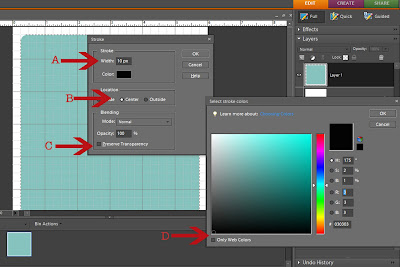
(click image to make it larger)

You have created your frame. Click on the eye by the shape layer to turn it off (you can delete it later.

7. Now for the fun part... you get to personalize it. Create a new layer and load the desired brush. I used KPertiet_LedgerGrids brush for the lower right corner to add interest to the frame.
Create a new layer, position your brush and click down once. If you want more than one brush put each brush on its own layer. That way you can move them around or delete them if you change your mind.

(click image to make it larger)

8. Choose your desired fonts to add text. (I used Problem Secretary and CK Cursive as my fonts ). Again, put each word or number on a new layer. Rotate the text and drag it to your desired locations.

(click image to make it larger)
9. Select your rectangular marquee tool and draw a selection around the date area. Make sure your frame layer is selected and press delete. Repeat for the signature area.
(click image to make it larger)

10. OK... almost finished! You'll want to delete your shape layer and rename the background layer to "DISCARD THIS LAYER" (you may need to change the background to a layer first). I like to keep my frame in layers so that I can easily change the date (since this is for my Project 365). I just open this file, choose all of the layers except "DISCARD THIS LAYER" and ctrl-drag to my edited photo. Be sure to save this in a place where you can find it easily. Remember that you can use this frame as a jumping off spot for another version.

(click image to make it larger)

WHEW!! I hope that this little tutorial has been a help to you. Let me know if you have any questions.

I will tell you that writing tutorials is NOT for the faint of heart! LOL! (Started at 2:50 pm- finished 6:21pm)
Jan 16, 2009

016- Ya Teach Your Kids...

... to grow up and lead independent, responsible, adult live... AND THEN DARNED IF THEY DON'T JUST GO AND DO IT!!!! (Quoted from a very wise woman… ME)

When Stuart arrived home from his 2-year mission to the Ireland Dublin Mission just over 2 years ago I knew that he wouldn’t stay at home forever. But this week we finally arrived at that day when he moved out and up to campus. Can I just say, “That doesn’t make me like it any better!”

Will I get used to being an empty-nester again? Sure I will, we’ve spent several years that way… but it will take some getting used to for both of us. It’s one of those bittersweet moments when you realize that everything you’ve worked so hard for all your life has finally happened and now we move on to the next season.

016
This is a composite photo of Stuart moving out and the empty room. (FONTS- Problem Secretary, CK Cursive, BRUSH- KPertiet_LedgerGrids-9, OVERLAY- kimi's homework overlay green)

Jan 15, 2009

Miss Joanie- Queen of Quilts

That is what Miss Becky tells me I am... Queen of Quilts. I'm not sure that is universally true, but it was true today at Camille's school.

Photobucket

Camille invited me to bring some of my quilts into class. They are doing a unit on quilts and she wanted me to show mine off. I had fun choosing which quilts to take. The whole point of this unit is shapes and patterns (I just love this kind of math!)

Photobucket

As I displayed each quilt the children would identify the shapes they saw: square, rectangle, triangle, rhombus [I ask you? when you were in first grade did you know what a rhombus was??? No? me neither!], hexagon and then today they learned octagon. We talked about the different shape that make up a block and how shapes can trick your eye into seeing a circle when it is really an octagon. What fun.

I really enjoyed my interaction with them. (But I may have been a bad/rowdy influence on them when it came time to finish and fold them up.) The kids were so cute flapping the quilt... poor Miss Camille, "First graders, One, Two, Three... eyes on me!"

Photobucket

015- Limited in Number... ONLY 3

For my fellow Jane Austen fans, I'm sure you'll recognized this quote from Emma. Today I feel like that... how can I limit myself to only three? But I hope they are not very dull things!

I love carrying my little camera with me. I feel like I have new eyes. Today I was headed to Camille's school (more later) I dipped down into the *bottoms* that is where it gets the coldest and where the hoar frost grows! Oh, I just love the look of hoar frost.

The first time I remember seeing it I was just a little girl on a very cold fall morning walking to school. I found a red leaf in the "short-cut" that was covered with hoar frost. I wanted so badly to take it with me to school for show and tell but by the time I got it to school the frost had melted from the warmth of my hand.

015 Hoar frost a

Today I stopped as soon as I could find a safe wide spot and started snapping away... so that is where my only three comes in... I had to whittle my number (say that with the English accent) to three (trill that R)!

015 Hoar frost b

As I got out to the fields that must be traversed to get to Camille's school there was more hoar frost encrusted trees, but by now it had warmed a little and the frost was starting to fall. It looked like fairy dust sparkling down to the road. Do you ever wish that you could photograph things the way you see them? I do... often I feel like there is so much lost in the 2-D capture.

015 Timpanogos & Frozen UT Lake

Lastly, here is Utah Lake, frozen and covered with snow. It is a large lake, but not too deep. This is the view from Camille's school. Kind of make that commute worth it to get to look at this every day. And, btw, that is Timpanogos again in the background ruling over her valley.

Jan 14, 2009

My First Texture Freebie

As I was leaving the Temple today, camera in hand from the steaming non-fountain I found this path of ice just beginning to form in the early evening cold. My first thought when I saw it was TEXTURE ! I just love the look of texture overlays on my photos.

ice on sidwalk

I think if you click on the image it will take you to the Flickr page where you can download it! Yup, I just tested it. It will take you to a page where you have the choice of sizes, I always downloaded the largest size, but it's up to you.

Enjoy!